
Create a WordPress settings page with the Settings API and your plugin stops hard-coding the values it should be asking for. The API does the tedious half: it renders the form, checks the nonce, saves the option, and prints the “Settings saved.” notice. So the work left to you is four calls — add_options_page(), register_setting(), add_settings_section() and add_settings_field(). First, this tutorial adds the menu entry. Next, it registers one option with a sanitize callback. Finally, it renders the form and reads the saved value back.
Requirements to create a WordPress settings page:
- WordPress 6.0 or newer (tested on WordPress 7.0.3). In fact, the Settings API has been stable for far longer.
- PHP 8.0 or newer (tested on PHP 8.3.6).
- An administrator account, because every step here needs the
manage_optionscapability. - Somewhere to put a plugin file: wp-content/plugins.
How To Create a WordPress Settings Page.
The objective is one screen under Settings that stores a notification email, a subject line and a checkbox. Because it is only one screen, everything lives in a single plugin file, ndriel-contact-settings.php, which starts with the usual header.
<?php
/**
 * Plugin Name: NdrieL Contact Settings
 * Description: A settings page built with the WordPress Settings API.
 * Version:     1.0.0
 */
Drop that in wp-content/plugins and activate it. Of course, nothing shows up yet — the screen appears once the next step runs.
Step 1.
First, add the menu entry. In addition to putting it under Settings, add_options_page() names the function that draws the page.
add_action('admin_menu', function () {
    add_options_page(
        'Contact Settings',        // browser title
        'Contact Settings',        // menu label
        'manage_options',          // capability
        'ndriel-contact',          // menu slug
        'ndriel_contact_page'      // render callback
    );
});
The capability is the access control for the whole screen. WordPress hides the menu from anyone without it, so an editor never sees the link. However, hiding a menu is not security on its own — step 4 checks the capability again before rendering.
Step 2.
Next, register the option. That single call tells WordPress the option exists, which group it saves under, and also how to clean it.
add_action('admin_init', function () {
    register_setting('ndriel_contact_group', 'ndriel_contact', [
        'type'              => 'array',
        'sanitize_callback' => 'ndriel_contact_sanitize',
        'default'           => ['email' => '', 'subject' => 'New enquiry', 'notify' => 0],
    ]);
});
Then note the three names doing three different jobs. ndriel_contact_group is the group the form posts; ndriel_contact is the row in wp_options; and ndriel-contact from step 1 is the page slug. In addition, storing one array rather than three separate options keeps them to a single database row.
Step 3.
Then, describe the fields. A section groups them, while each field names the function that prints its input.
    add_settings_section(
        'ndriel_contact_main',
        'Enquiry notifications',
        function () {
            echo '<p>Where the contact form sends an enquiry.</p>';
        },
        'ndriel-contact'
    );

    add_settings_field('email', 'Notification email', 'ndriel_contact_email_field',
        'ndriel-contact', 'ndriel_contact_main');

    add_settings_field('subject', 'Subject line', 'ndriel_contact_subject_field',
        'ndriel-contact', 'ndriel_contact_main');

    add_settings_field('notify', 'Send a copy to the visitor', 'ndriel_contact_notify_field',
        'ndriel-contact', 'ndriel_contact_main');
Each callback prints one input, and the name attribute must use the array syntax so the values arrive together.
function ndriel_contact_email_field()
{
    $options = get_option('ndriel_contact');
    printf('<input type="email" name="ndriel_contact[email]" value="%s" class="regular-text">',
        esc_attr($options['email'] ?? ''));
}

function ndriel_contact_notify_field()
{
    $options = get_option('ndriel_contact');
    printf('<label><input type="checkbox" name="ndriel_contact[notify]" value="1" %s> Yes</label>',
        checked($options['notify'] ?? 0, 1, false));
}
The sanitize callback runs on every save, so it is the only place that decides what reaches the database. Therefore, reject a bad value there and keep the old one.
function ndriel_contact_sanitize($input)
{
    $clean = [];

    $clean['email'] = sanitize_email($input['email'] ?? '');

    if ($clean['email'] === '' && !empty($input['email'])) {
        add_settings_error('ndriel_contact', 'bad_email',
            'That notification email is not valid, so it was not saved.');
        $clean['email'] = get_option('ndriel_contact')['email'] ?? '';
    }

    $clean['subject'] = sanitize_text_field($input['subject'] ?? '');
    $clean['notify']  = empty($input['notify']) ? 0 : 1;

    return $clean;
}
Step 4.
Now draw the page. The form posts to options.php, so WordPress core handles the save, which is why there is no save code anywhere in this plugin.
function ndriel_contact_page()
{
    if (!current_user_can('manage_options')) {
        return;
    }
    ?>
    <div class="wrap">
        <h1><?php echo esc_html(get_admin_page_title()); ?></h1>
        <form action="options.php" method="post">
            <?php
            settings_fields('ndriel_contact_group');
            do_settings_sections('ndriel-contact');
            submit_button('Save Settings');
            ?>
        </form>
    </div>
    <?php
}
In fact, two functions carry the whole form. settings_fields() prints the hidden group, action and nonce inputs, while do_settings_sections() prints every section and field you registered, wrapped in the admin’s own table markup.
<input type='hidden' name='option_page' value='ndriel_contact_group' />
<input type="hidden" name="action" value="update" />
<input type="hidden" id="_wpnonce" name="_wpnonce" value="2f8c6ca20b" />
<h2>Enquiry notifications</h2>
<p>Where the contact form sends an enquiry.</p>
<table class="form-table" role="presentation">
<tr><th scope="row">Notification email</th>
<td><input type="email" name="ndriel_contact[email]" value="editor@ndriel.com" class="regular-text"></td></tr>
</table>
Step 5.
Finally, use the value. get_option() reads it anywhere in WordPress, so the front end never needs to know a settings screen exists.
$options = get_option('ndriel_contact');

wp_mail(
    $options['email'],
    $options['subject'],
    'Someone filled in the contact form.'
);
Of course, always pass a fallback for a fresh install. The default from step 2 covers that, because get_option() returns it until the first save writes a row.
Result of the WordPress settings page.
As a result, the screen appears under Settings → Contact Settings, saves without a line of form-handling code, and returns the values on demand. This is the real output from WordPress 7.0.3:
> print_r(get_option('ndriel_contact'));
Array
(
    [email] => editor@ndriel.com
    [subject] => New enquiry from ndriel.com
    [notify] => 1
)

> // now save "not an address" in the email field
> print_r(get_option('ndriel_contact'));
Array
(
    [email] => editor@ndriel.com          <-- unchanged
    [subject] => New enquiry from ndriel.com
    [notify] => 1
)
settings error [bad_email]: That notification email is not valid, so it was not saved.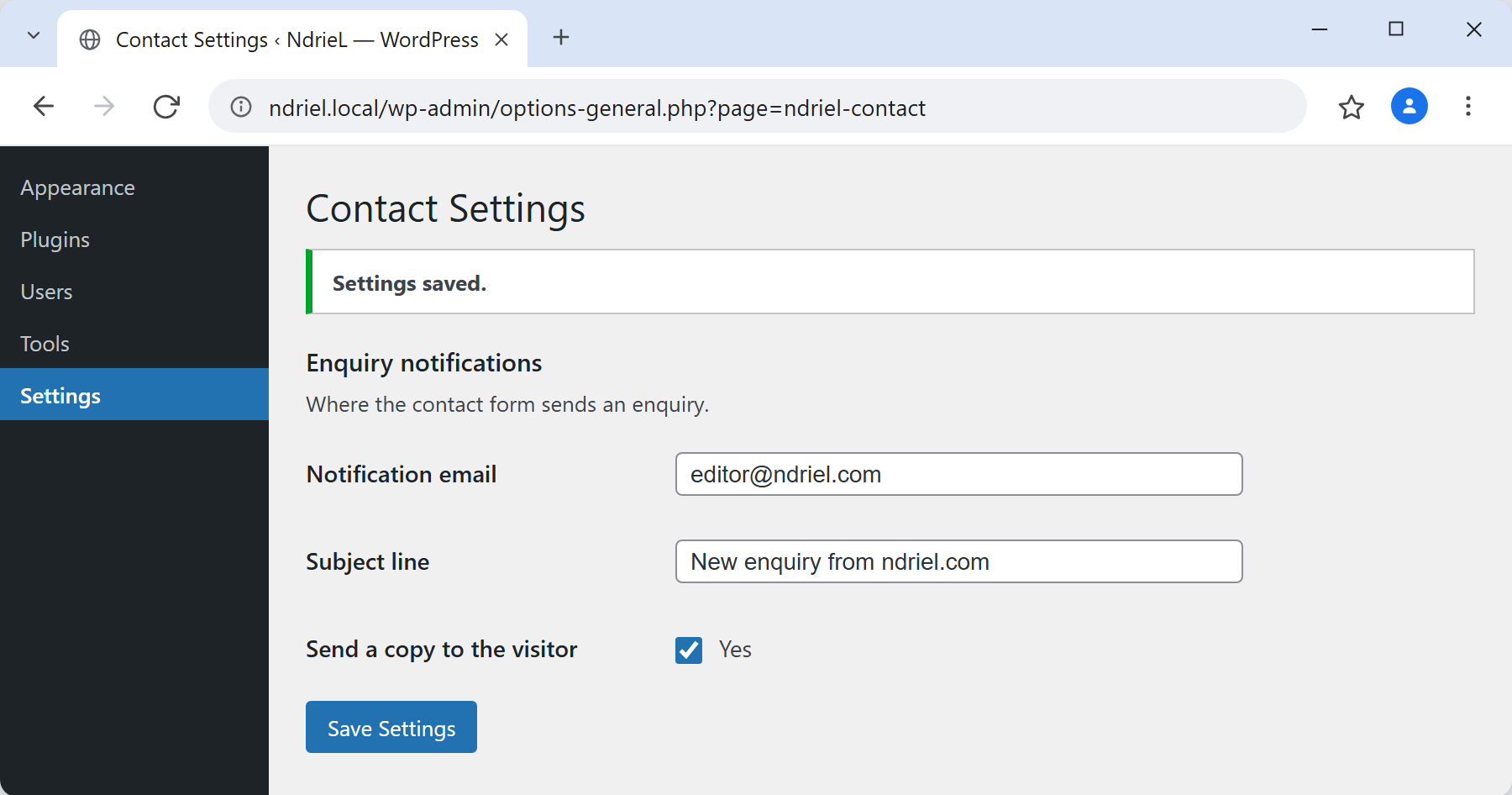
Notes on the WordPress settings page:
- The sanitize callback is your only validation. options.php handles everything else about the request — the nonce, the capability, the redirect. However, it inspects none of your values, so assume the input is hostile.
- A checkbox that is off sends no value at all. Therefore, read it with
empty()rather than expecting a0to arrive. register_setting()must run onadmin_init. Register it later and options.php rejects the save with “options page not found”, because that page checks the allow-list before your code has added to it.- For example, add
'show_in_rest' => trueto expose the option through the REST API, which is how a block editor sidebar would read it. That pairs well with a custom REST API endpoint when the plugin grows. - Also, this is the admin screen the rest of the series assumes. A stored option is what a shortcode reads for its defaults, and what a custom meta box falls back to per post.
- Finally, uninstalling should clean up. Add
delete_option('ndriel_contact')to an uninstall.php file, or the row outlives the plugin.
