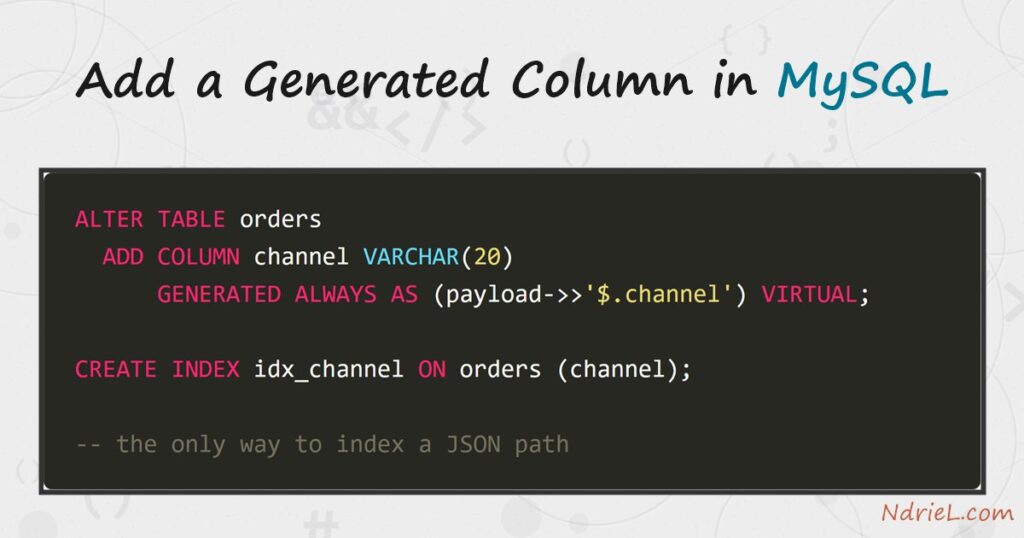
A generated column in MySQL holds a value the server computes from other columns in the same row. You never write to it, and it can never drift out of step with its source. First, this tutorial adds a STORED column that multiplies two numbers. Next, it adds a VIRTUAL one that lifts a key out of a JSON document. Then it shows what happens when you try to write to either. Finally, it puts an index on the virtual column, which is the only way to index a JSON path.
Requirements for a generated column in MySQL:
- MySQL 8.0 or newer (tested on MySQL 8.4.10). Generated columns arrived in 5.7, and indexing them works there too.
- Terminal access to the mysql client, and a user that can create a database.
- A table with a value you keep recomputing in queries. The setup below creates one.
How To Add a Generated Column in MySQL.
The objective is an orders table where the line total and the sales channel are always correct, without the application remembering to set them. Create the demo data first, so every query below returns exactly what the article shows.
CREATE DATABASE ndriel_generated_demo;
USE ndriel_generated_demo;

CREATE TABLE orders (
    id         INT AUTO_INCREMENT PRIMARY KEY,
    sku        VARCHAR(20) NOT NULL,
    unit_price DECIMAL(10,2) NOT NULL,
    quantity   INT NOT NULL,
    payload    JSON NOT NULL
);

INSERT INTO orders (sku, unit_price, quantity, payload) VALUES
    ('AUR-14', 45999.00, 2, '{"channel": "web",   "customer": {"name": "Anna Novak", "city": "Berlin"}}'),
    ('NIM-X',  21499.00, 1, '{"channel": "store", "customer": {"name": "Ben Carter", "city": "Toronto"}}'),
    ('ORB-DP', 63500.00, 3, '{"channel": "web",   "customer": {"name": "Clara Dubois", "city": "Nairobi"}}'),
    ('PIX-11', 15750.00, 5, '{"channel": "web",   "customer": {"name": "David Osei", "city": "Osaka"}}'),
    ('NIM-X',  21499.00, 2, '{"channel": "phone", "customer": {"name": "Elena Ruiz", "city": "Berlin"}}');
The line total is unit_price times quantity, and the channel sits inside the JSON document. Today every query that needs them recomputes both.
Step 1.
First, add both columns in one statement. The syntax is ordinary ALTER TABLE work, with an expression where a default would normally sit.
ALTER TABLE orders
  ADD COLUMN line_total DECIMAL(12,2)
      GENERATED ALWAYS AS (unit_price * quantity) STORED,
  ADD COLUMN channel VARCHAR(20)
      GENERATED ALWAYS AS (payload->>'$.channel') VIRTUAL;
SELECT id, sku, unit_price, quantity, line_total, channel FROM orders;+----+--------+------------+----------+------------+---------+
| id | sku | unit_price | quantity | line_total | channel |
+----+--------+------------+----------+------------+---------+
| 1 | AUR-14 | 45999.00 | 2 | 91998.00 | web |
| 2 | NIM-X | 21499.00 | 1 | 21499.00 | store |
| 3 | ORB-DP | 63500.00 | 3 | 190500.00 | web |
| 4 | PIX-11 | 15750.00 | 5 | 78750.00 | web |
| 5 | NIM-X | 21499.00 | 2 | 42998.00 | phone |
+----+--------+------------+----------+------------+---------+Both columns filled themselves for the existing rows. This is a different move from adding a plain column with ALTER TABLE, where a new column arrives empty or holding a default.
Step 2.
Next, understand which keyword you picked. STORED writes the value to disk with the row; VIRTUAL computes it on the fly on every read, and costs no space.
STORED   -> uses disk, cheap to read, rewritten whenever the source changes
VIRTUAL  -> uses no disk, computed per read, still indexable
VIRTUAL is the default and the right starting choice. Prefer STORED only when the expression is genuinely expensive, because it turns every write to a source column into a write here too. Note that adding a STORED column rebuilds the table, while a VIRTUAL one is an instant metadata change.
Step 3.
Then, try to set one by hand. The server refuses, and that refusal is the guarantee you are buying.
UPDATE orders SET line_total = 1.00 WHERE id = 1;ERROR 3105 (HY000): The value specified for generated column 'line_total' in table 'orders' is not allowed.Change the source instead and the value follows immediately.
UPDATE orders SET quantity = 10 WHERE id = 1;
SELECT id, unit_price, quantity, line_total FROM orders WHERE id = 1;
+----+------------+----------+------------+
| id | unit_price | quantity | line_total |
+----+------------+----------+------------+
| 1 | 45999.00 | 10 | 459990.00 |
+----+------------+----------+------------+An INSERT must also skip the column, or name every column explicitly and omit it. Because no statement can supply the value, no statement can get it wrong.
Step 4.
Now index the virtual column. Recall from storing and querying JSON data in MySQL that MySQL refuses an index on the JSON column itself — the error message there points at exactly this technique. Look at the plan before the index exists.
UPDATE orders SET quantity = 2 WHERE id = 1;   -- put the demo data back

EXPLAIN SELECT id, sku FROM orders WHERE channel = 'web';
+----+-------------+--------+------------+------+---------------+------+---------+------+------+----------+-------------+
| id | select_type | table | partitions | type | possible_keys | key | key_len | ref | rows | filtered | Extra |
+----+-------------+--------+------------+------+---------------+------+---------+------+------+----------+-------------+
| 1 | SIMPLE | orders | NULL | ALL | NULL | NULL | NULL | NULL | 5 | 20.00 | Using where |
+----+-------------+--------+------------+------+---------------+------+---------+------+------+----------+-------------+Then create the index and look again.
CREATE INDEX idx_channel ON orders (channel);
EXPLAIN SELECT id, sku FROM orders WHERE channel = 'web';+----+-------------+--------+------------+------+---------------+-------------+---------+-------+------+----------+-------+
| id | select_type | table | partitions | type | possible_keys | key | key_len | ref | rows | filtered | Extra |
+----+-------------+--------+------------+------+---------------+-------------+---------+-------+------+----------+-------+
| 1 | SIMPLE | orders | NULL | ref | idx_channel | idx_channel | 83 | const | 3 | 100.00 | NULL |
+----+-------------+--------+------------+------+---------------+-------------+---------+-------+------+----------+-------+Three columns changed and they tell the whole story. The access type moved from ALL to ref, the key column names the index instead of NULL, and filtered rose from 20 to 100 because every row the index returns is a match. For that vocabulary, see creating an index and reading EXPLAIN.
Step 5.
Finally, check whether your existing queries need rewriting. They do not.
EXPLAIN SELECT id, sku FROM orders WHERE payload->>'$.channel' = 'web';+----+-------------+--------+------------+------+---------------+-------------+---------+-------+------+----------+-------+
| id | select_type | table | partitions | type | possible_keys | key | key_len | ref | rows | filtered | Extra |
+----+-------------+--------+------------+------+---------------+-------------+---------+-------+------+----------+-------+
| 1 | SIMPLE | orders | NULL | ref | idx_channel | idx_channel | 83 | const | 3 | 100.00 | NULL |
+----+-------------+--------+------------+------+---------------+-------------+---------+-------+------+----------+-------+That query never mentions channel, yet it used the index anyway. MySQL matched the expression in the WHERE clause against the generated column’s definition and substituted one for the other. As a result you can add the column and the index to a live schema, and old queries speed up without a single edit.
Result of the generated column in MySQL.
The payoff is the plan for a query that was unindexable a moment earlier. This is the real output from MySQL 8.4.10, before and after the index:
mysql> EXPLAIN SELECT id, sku FROM orders WHERE channel = 'web';
+----+-------------+--------+------------+------+---------------+------+---------+------+------+----------+-------------+
| id | select_type | table  | partitions | type | possible_keys | key  | key_len | ref  | rows | filtered | Extra       |
+----+-------------+--------+------------+------+---------------+------+---------+------+------+----------+-------------+
|  1 | SIMPLE      | orders | NULL       | ALL  | NULL          | NULL | NULL    | NULL |    5 |    20.00 | Using where |
+----+-------------+--------+------------+------+---------------+------+---------+------+------+----------+-------------+
1 row in set, 1 warning (0.00 sec)
mysql> CREATE INDEX idx_channel ON orders (channel);
Query OK, 0 rows affected (0.04 sec)
Records: 0 Duplicates: 0 Warnings: 0
mysql> EXPLAIN SELECT id, sku FROM orders WHERE channel = 'web';
+----+-------------+--------+------------+------+---------------+-------------+---------+-------+------+----------+-------+
| id | select_type | table  | partitions | type | possible_keys | key         | key_len | ref   | rows | filtered | Extra |
+----+-------------+--------+------------+------+---------------+-------------+---------+-------+------+----------+-------+
|  1 | SIMPLE      | orders | NULL       | ref  | idx_channel   | idx_channel | 83      | const |    3 |   100.00 | NULL  |
+----+-------------+--------+------------+------+---------------+-------------+---------+-------+------+----------+-------+
1 row in set, 1 warning (0.00 sec)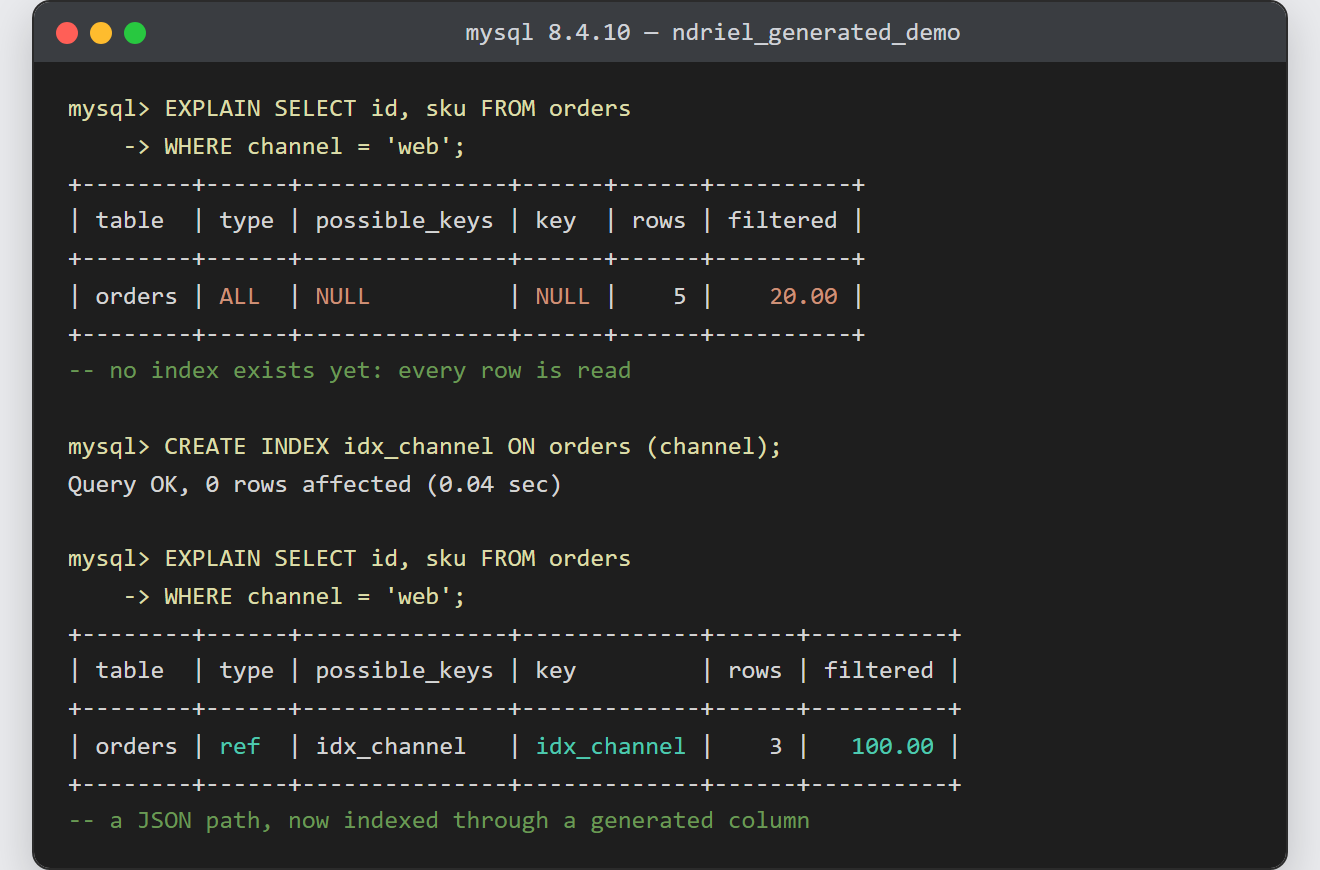
Notes on the generated column in MySQL:
- Start with
VIRTUAL. It costs no storage, it is still indexable, and switching toSTOREDlater is oneALTER TABLEaway. - The expression must be deterministic. MySQL refuses functions such as
NOW(),RAND()andUUID(), along with subqueries and references to other tables. - A column may build on another generated column, provided that the table defines that one earlier.
- Give the column a type wide enough for every row. A
VARCHAR(20)over a JSON path silently truncates a longer value, so size it from the data rather than the sample. - Indexing a
VIRTUALcolumn still writes an index entry per row. The saving is table space, not index space. - This closes the loop on the JSON series. A document keeps the flexible shape, while the handful of keys you actually filter on get real indexed columns beside it.